Fixing the Chaos:
Digital Asset Platform for Graphic Design Agencies
DesignOps had a vision:
A sleek, all-in-one platform where design agencies and freelancers could collaborate, manage assets, and get client feedback, all without 7 different tabs open.
So we stepped in to answer a simple but critical question:
"Would busy design teams actually use it?"
What We Did
We partnered with DesignOps to learn:
- 1How do creative teams really collaborate today?
- 2What tools do they love, hate, duct-tape together?
- 3Would they trust a new tool — and how should it work?
We ran:
- User interviews with 10 design professionals
- Prototype tests using Adobe XD
- Note-mapping via Mural and Google Jamboard
What We Found
designers felt frustrated by communication gaps — especially when feedback was filtered through account managers
said they'd love a tool that combines collaboration, storage, and client feedback in one place
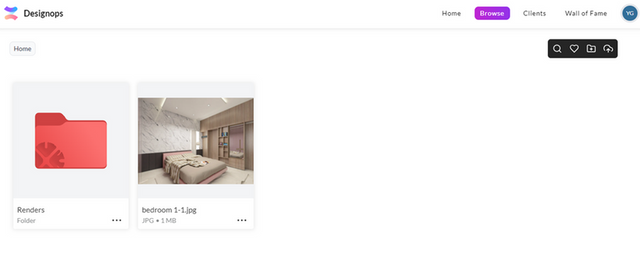
The in-image comment feature stood out, but it wasn't easy to find at first
Key Insights
Fragmented tools kill flow
Designers lose time context-switching across email, Slack, Drive, and Asana.
Integrated, customizable workspaces = dream setup
They want the freedom to tailor their space without drowning in options.
Language matters
Terms like 'Collections' confused users — clarity = trust.
User Persona
Mark
Age: 25
Graphic Designer
Location: Bangalore | Education: Visual Communication
Characteristics
- • Efficient and organized
- • Appreciates clear communication and feedback
- • Frustrated by scattered files and version control issues
- • Creative and detail-oriented
- • Prioritizes collaboration
For Mark, it's more about...
- Finding the right starting point for tasks in the morning
- Customizing the workspace to his needs
- Smooth communication with their clients and superiors
And less about...
- Inefficient workspace setup
- Communication bottlenecks
Key Needs
Seamless Integration
Ability to easily integrate their files and folders to their workflow
Clear Communication
Communicate with clients and stakeholders seamlessly
Professional Presentation
Impress clients with professional presentations and portfolios
User Quotes
"If I could just send a link to the client and get comments in one place, that would save me hours."
"Love the comment feature — just took me a second to find it."
Usability Takeaways
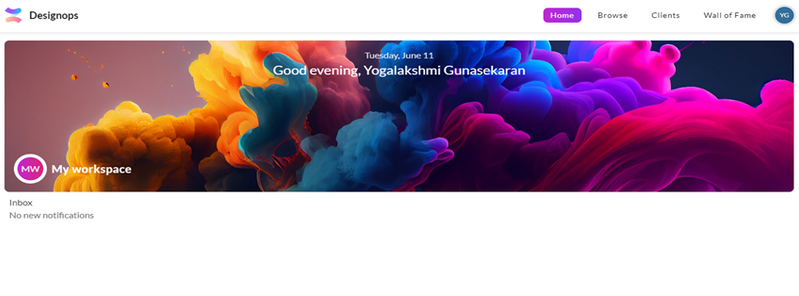
Workspace
Add customization features and onboarding nudges
Browse
Highlight the image commenting system more clearly
Clients
Simplify how assets are assigned, and rework ambiguous terminology
Bonus Feature Love
Wall of Fame (auto-curated portfolio) → massive hit!
Designers said it saved hours and looked client-ready out of the box.
Participant Feedback
"Miscommunication always happens when ideas go through layers of people."
"If I could just send a link to the client and get comments in one place, that would save me hours."
"Love the comment feature — just took me a second to find it."
Takeaway
You don't need more features, you need clarity.
The best tools make users feel understood, not overwhelmed.